
HotStock - in-stock alerts
LiteboxShopping
3.44.03K Reviews
- Version
- 1.0.184
- Installs
- 500.00K
- Age Rating
- Everyone
Screenshots
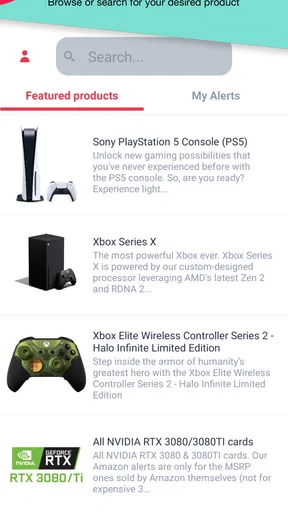
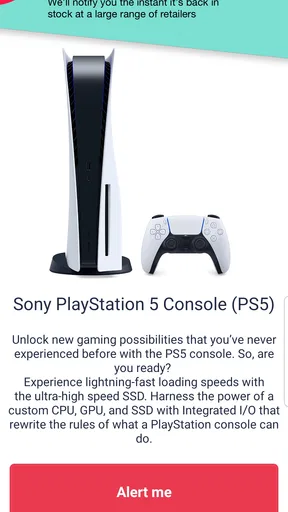

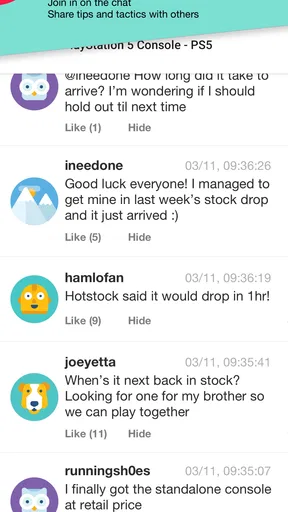
Our Review of HotStock - in-stock alerts
 Analysis by Appyee
My take on HotStock is straightforward: it’s most useful when you have a specific item in mind and availability, rather than browsing or bargain hunting, is the main obstacle. I like the idea of letting an alert do the checking while I get on with my day. It can make a frustrating search more manageable, though it can’t guarantee that I’ll complete a purchase before stock disappears.
Where an alert helps—and where it doesn’t
The best reason to use an in-stock alert is to replace a repetitive habit. If I keep opening the same retailer pages to see whether a product has returned, having a notification watch for a change is a more sensible routine. That is especially helpful for items that sell out quickly, or when I’m not able to monitor a screen throughout the day.
I would still treat an alert as a prompt to act, not as a reservation. A notification can tell me to check a product page, but I should be ready to confirm the item, seller, delivery details, and final price myself. Stock can move quickly, and an alert cannot remove the usual checkout steps or guarantee that the listing will still be available when I arrive.
That distinction matters if I’m shopping for something time-sensitive. For a gift needed by a particular day, I’d use HotStock alongside a backup choice rather than make the alert my only plan. For a purchase I can postpone, by contrast, waiting for a suitable restock is much less stressful.
A more deliberate way to track a product
Before setting an alert, I’d narrow down exactly what I want: the right model, size, colour, or other variant. A broad search can lead me to follow a close alternative that doesn’t actually meet my needs. Spending a moment checking the product details first makes the notification more useful and reduces the chance of making a rushed choice.
I’d also decide in advance which retailers I’m comfortable buying from. If I have a preferred seller, setting the alert around that preference helps keep the results relevant. If I’m flexible, monitoring more options may improve my chances, but it also means I should compare the retailer and checkout details rather than buying from the first alert without a second look.
For several wanted items, I’d prioritize rather than treat every alert as equally urgent. Keeping track of multiple products can save time, but too many notifications can make it harder to spot the one that matters. I’d start with the item I’m most likely to buy, then add other searches only when I have a clear reason to watch them.
When waiting is better than buying fast
There is a useful trade-off between speed and judgment. If the product is genuinely hard to find and I’m already happy with its price, a prompt alert may help me act in time. If I’m still comparing models or hoping for a lower price, the notification is better treated as a chance to reassess than an instruction to purchase immediately.
I would avoid letting scarcity make the decision for me. Before tracking anything expensive, I’d set a personal spending limit and check that the item is the right fit. That small bit of preparation is more valuable than rushing through checkout because an alert has made the product feel urgent.
Who will get the most from it
HotStock makes the most sense for shoppers who know what they want but don’t want to keep checking for it manually. It can suit a person waiting for a particular gadget, a collector looking for a specific release, or a parent trying to find a sought-after toy. The common thread is a clear target and enough flexibility to buy when an alert arrives.
It is less compelling if I enjoy browsing broadly, need guaranteed delivery by a fixed date, or only want the cheapest possible offer. In those cases, a retailer’s own stock notifications, comparison shopping, or simply choosing an available alternative may be a better fit. An alert app is most helpful when availability is the problem; it is not a substitute for deciding what to buy or checking whether a deal is good.
On Android, the app is listed for devices running version 7.0 or later, and it is rated for Everyone. That makes it accessible to a broad range of users, although the useful question is less about age than whether the person is comfortable acting on notifications and completing a purchase through a retailer.
What’s the Buzz About?
So, HotStock is this nifty little app designed to keep you updated on product availability. Imagine having a personal assistant that’s constantly monitoring stock levels for you. Whether you’re hunting for that elusive gaming console, the latest smartphone, or even a hard-to-find toy, this app has your back.
The beauty of HotStock is its simplicity. You start by searching for the product you’re after. Once you find it, just set up an alert. The app does the heavy lifting by scanning numerous retailers and notifying you the moment your desired item is back on the shelves. No more endless refreshing and late-night browsing sessions!
Setting Up and Getting Started
Getting started with HotStock is as easy as pie. After downloading the app, you’re greeted with a straightforward interface. No clutter, just a clean layout that gets straight to the point.
- Search for the item you’re interested in.
- Set up an alert with a simple tap.
- Customize alerts for specific retailers if you have preferences.
You’ll receive notifications via email or push alerts, depending on your settings. It’s super intuitive, and even if tech isn’t your forte, you’ll navigate it like a pro in no time.
A Closer Look at Features
One of the standout features is the app’s real-time tracking. HotStock doesn’t just give you a heads-up when items are in stock; it also offers price tracking. This is gold if you’re hunting for deals or waiting for prices to drop before splurging on a purchase.
Another great feature is its community-driven updates. Users can report stock changes, making the app not just a tool but a community of savvy shoppers helping each other out. It’s like having a network of eyes on the lookout.
The User Experience
From my experience, the app runs smoothly without any hiccups. The notifications are timely and accurate, which is crucial for snagging those hard-to-get items. The interface is user-friendly, and the setup process is a breeze.
The app also lets you track multiple items simultaneously, which is a lifesaver if you’re on the hunt for more than one product. Just add them to your list, and you’re good to go.
Is It Worth the Hype?
In one word: absolutely. If you’re someone who loves a good deal or often finds yourself missing out on popular items, HotStock is a must-have. It saves you time, effort, and quite possibly your sanity.
The community aspect is a bonus, providing real-time updates and ensuring the information is as accurate as possible. It’s a game-changer for anyone who hates the frustration of out-of-stock notifications.
In conclusion, HotStock is more than just an app; it’s like having a personal shopping assistant in your pocket. Whether you're a bargain hunter or a tech enthusiast, it’s a handy tool worth checking out. So, next time you’re trying to grab that hot-ticket item, let HotStock do the legwork for you. You can thank me later!
What the app’s popularity and cost tell me
HotStock is a free shopping app from Litebox, with optional in-app purchases listed from $5.49 to $10.99 per item. I’d start with the free experience and decide whether any paid option is worthwhile only after I know how often I use the alerts. Someone checking one product occasionally may have little reason to spend extra, while a frequent restock watcher may value additional convenience if it suits their needs.
Its average rating is 3.5 from around 7,800 ratings, with about 4,000 written reviews, and it has over 500,000 installs. I read that as evidence that the app has found a real audience, not as a promise that every alert will work perfectly for every shopper. Stock monitoring depends on the product and retailer being followed, so I’d judge it by how relevant and actionable the alerts are for my own search.
The current version is 1.0.178, and the app was released on June 25, 2020. Those details are useful context, but I wouldn’t choose a stock-alert app on version numbers alone. My practical test would be whether it can help me follow the exact item I want and whether its alerts fit my shopping habits without creating noise.
A realistic restock routine
Imagine I’m looking for a particular console before a weekend when I’ll have time to set it up. I’d search for the exact model, check that the result matches what I intend to buy, and choose retailer alerts that I’m willing to act on. Then I’d leave the app to do the monitoring instead of refreshing pages between other tasks.
If a notification arrives while I’m busy, I’d first open the retailer page and verify that the product is available at a price I accept. If it has sold out again, I’d keep my plan steady rather than widen the search impulsively. If it is available, I’d complete the purchase only after checking the seller and delivery terms. The benefit is not that the app makes the decision for me; it gives me a timely reason to make that decision.
The same approach works for less urgent searches, such as a toy or phone I would like but do not need immediately. I can keep the item on my watch list while continuing to consider alternatives. That helps prevent the common trap of treating a rare restock as automatically worth buying.
How it differs from checking retailers yourself
The usual alternative is to visit retailer sites one at a time, use any stock notification they offer, or search again when I remember. That can be enough for a product sold by one shop, especially if that retailer already provides a useful alert. HotStock is more appealing when I want a single place to watch for availability across multiple retailers, rather than maintaining a routine of separate checks.
There is a trade-off: a retailer’s own page is the place where I can verify current availability and purchase terms, while an alert service is a discovery and notification layer. I would use HotStock to reduce the checking, then rely on the retailer page for the final decision. Price tracking can add context to the search, but it does not replace checking the total cost and deciding whether the offer is genuinely right for me.
That makes it a poor fit for ordinary groceries or anything I can easily buy from a nearby shop. It is also not the best answer when the main challenge is finding the lowest price across many sellers; a dedicated comparison process is more appropriate for that. The app’s value is clearest when the target is specific and getting a chance to buy it is the hard part.
My final recommendation
For shoppers who repeatedly miss the return of a particular hard-to-find product, HotStock is a practical tool to try. Its free entry point makes it easy to see whether alerts suit your routine, and its focused purpose is preferable to spending time revisiting the same product pages. I’d use it with a shortlist, sensible retailer preferences, and a spending limit—not as a reason to buy in a hurry.
I would skip it if I need a guaranteed item by a deadline, prefer to browse without a target, or would rather buy whatever is available today. Those shoppers are better served by a direct retailer search or an in-stock alternative. For everyone else, my verdict is positive but measured: HotStock can make waiting less tedious and help me notice an opportunity, while the final checks and purchase judgment still belong to me.
Verdict
Strengths of HotStock - in-stock alerts
- Real-time stock alerts keep you updated.
- User-friendly interface, easy navigation.
- Customizable notifications for specific items.
- Supports multiple retailers for wide coverage.
- Quick setup with no complex requirements.
Limitations of HotStock - in-stock alerts
- Occasional delay in alert notifications.
- Limited features in the free version.
- Ads can be intrusive at times.
- Requires internet connection for updates.
- Some items may have inaccurate availability.
Similar Picks in This Category
View All
SHEIN-Shopping Online
Roadget Business PTE. LTD.4.8

Amazon Shopping
Amazon Mobile LLC4.4


Mercado Libre: Compras online
Mercado Libre4.8

Wish: Shop and Save
Wish US Holdings LLC4.7

Alibaba.com - B2B marketplace
Alibaba Mobile4.4
Frequently Asked Questions
What is HotStock and how does it work?
HotStock is a real-time stock alert app designed to notify users when high-demand products are back in stock at major retailers. By using advanced tracking algorithms, it monitors stock availability and sends instant alerts via push notifications, ensuring users don’t miss out on popular items. Simply add your desired items to the watchlist and customize your alert settings.
Is HotStock free to use, or does it require a subscription?
HotStock offers a free version with limited features, allowing users to receive basic stock alerts. However, for more advanced functionalities such as faster notifications and tracking multiple items simultaneously, a premium subscription is available. This subscription enhances the user experience by providing priority access to stock alerts and additional customization options.
How reliable are HotStock notifications?
HotStock aims to provide highly reliable notifications by constantly updating its stock tracking algorithms. While it endeavors to send alerts as soon as an item is in stock, there may be occasional delays due to retailer system updates or high server loads. Users are encouraged to act quickly on alerts to maximize their chances of purchasing the desired items.
Does HotStock support international retailers or is it limited to specific regions?
HotStock primarily focuses on major retailers in the United States, but it is continuously expanding its reach to include international markets. Users can check the app's supported regions and retailers list to ensure their preferred stores are covered. Expansion efforts are ongoing, so new locations may be added over time.
Can I customize which products I receive alerts for on HotStock?
Yes, HotStock allows users to fully customize their alert preferences. You can add specific items to your watchlist and set personalized notification settings for each product. This includes choosing which retailers to track and setting alert priorities, ensuring you only receive notifications for the items you are most interested in acquiring.
